How to Turn Twitch VODs Into Clips Without Editing (2026)

Converting Twitch VODs into shareable clips no longer requires hours of manual editing. At FrostyTools, we've helped thousands of streamers automate this process using tools that identify highlight moments and format them for TikTok, Reels, and Shorts. The most effective approach depends on your content type: competitive gamers benefit from AI that detects kills and wins, talk show hosts need transcript analysis, and variety streamers benefit from AI that evaluates entertainment value rather than game events or transcripts.
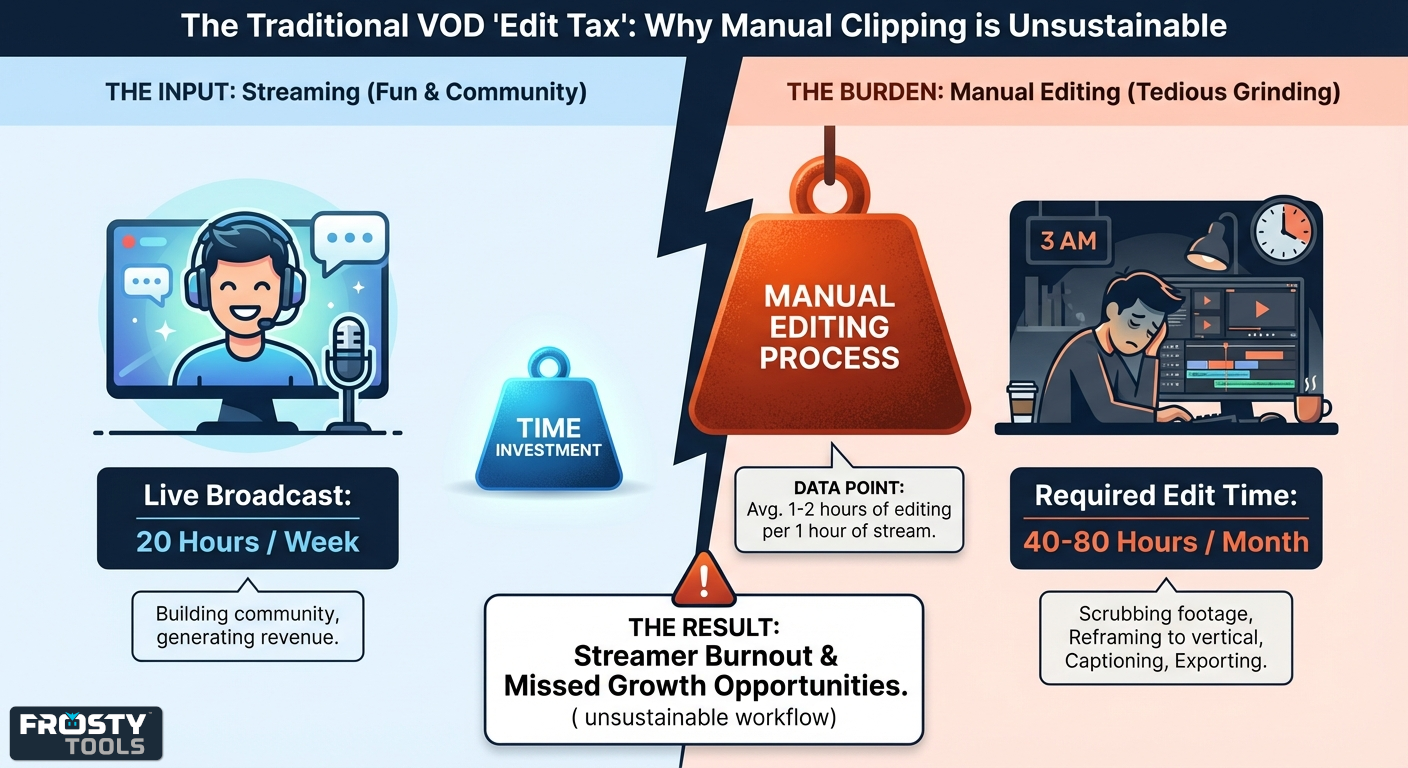
Growth on Twitch now happens primarily off-platform. While your live streams build community and generate revenue, discovery comes from short-form content on TikTok, YouTube Shorts, and Instagram Reels. The problem is that creating this content traditionally consumes 1 to 2 hours of editing for every 1 hour of streaming. We've seen streamers abandon content creation entirely because the time investment of manual editing feels unsustainable.
Why Twitch Streamers Need Short-Form Clips
Twitch's discovery system favors channels that already have high viewership. Small and mid-sized creators struggle to gain visibility through the platform's browse categories alone. In contrast, TikTok and YouTube Shorts use recommendation algorithms that distribute content based on engagement metrics rather than follower count. A single viral clip can funnel hundreds of viewers to your live stream.
The challenge is producing enough content to feed these algorithms. A streamer broadcasting 20 hours per week generates roughly 80 hours of raw footage per month. Finding the best moments, reformatting them for vertical video, and adding captions manually could consume 40+ hours of editing time.
The Traditional "Edit Tax" Problem
Manual VOD editing follows a predictable workflow:
- Scrub through hours of footage looking for highlights
- Import selected segments into editing software
- Reframe horizontal video to vertical format
- Center the action and face cam
- Add captions and effects
- Export and upload to multiple platforms
This process typically requires 30-60 minutes of editing per usable clip, not even counting the hours spent scrubbing the VOD in the first place. Posting at least once/day is recommended to maintain algorithmic momentum, and the workload becomes impossible without hiring an editor.
Another core technical challenge is "saliency detection." A 1920x1080 horizontal stream contains UI elements, gameplay, facecam, and chat overlay distributed across the entire frame. Converting this to 1080x1920 vertical video requires intelligent decision-making about which pixels to keep. Early automation tools used simple center-cropping, which often cut off critical information like health bars or kill feeds.
Three Approaches to Automated Clipping
Not all automatic clipping tools work the same way. Understanding how they detect highlights helps you pick the right one for your content.
Game Event Detection (Eklipse)
Tools like Eklipse.gg are trained to recognize in-game events for specific titles. The AI reads your screen—kill feeds, victory banners, elimination notifications—and clips when it detects moments that typically make good highlights.
This works well when highlights follow predictable patterns. Got a triple kill in Valorant? Clipped. Won the match in Warzone? Clipped. The system knows what "good" looks like because it's been trained on over 1,000 supported games.
You can also say "Clip it!" during your stream to mark moments manually, combining automation with your own judgment for moments the algorithm might miss.
Works best for: Competitive gaming where the scoreboard tells the story: FPS, MOBAs, battle royales.
Trade-offs: Primarily optimized for gaming. It does work on "Just Chatting" and variety content by detecting emotional moments, but Eklipse notes that accuracy is lower compared to supported games where the AI can read specific on-screen events.
Transcript Analysis (OpusClip)
Dialogue-heavy content requires different detection methods. Tools like OpusClip convert your audio to text, then use AI to identify the most clippable quotes based on linguistic patterns. The system looks for hooks that grab attention, punchlines that land, and moments with potential to perform well on social media.
For streams with multiple speakers, the AI tracks who's talking and automatically reframes the video to keep the active speaker centered.
Works best for: Podcasters, interview shows, educational content; anything where the words carry the value.
Trade-offs: Designed to maximize clip output. Their own metrics highlight producing "63% more shareable clips" - great if you need volume for a content calendar, but it means more sorting if you only want the best moments.
Watch-Value Analysis (Highlight Hunter)
The third approach asks a different question: instead of "what happened?" or "what was said?", it asks "what's actually worth sharing?"
Highlight Hunter analyzes your VOD for genuine watch value: streamer reactions, comedic timing, big in-game victories, interesting stories, useful game demonstrations, all of it. It understands all audiovisual content and effectively “watches” the actual video. It then uses that combined information to evaluate where the good moments in the VOD are.
The AI prioritizes complete moments: jokes with setup and punchline, tension building into the big play, the full explanation of a game mechanic, reactions with trigger and response. Clips that work on their own, without "you had to be there" context. Also, if the streamer says anything out loud to suggest they want a clip (“we need a clip of that”, "clip it!", “someone clip”, etc.) those moments get picked up too.
Two processing modes:
- Scout mode finds solid clip markers on a budget
- Supercharged mode pushes deeper analysis for finding the best, most complete clips
Works best for: Any Twitch streamer regardless of content, since it analyzes the video itself.
Trade-offs: Only available for Twitch VODs
What sets it apart:
- No clip limits — Long streams, subathons, and special events aren't artificially capped. Every potential highlight gets evaluated.
- Native montage export — Download a cut reel of your stream's best moments as a single video, ready for YouTube or Discord.
- Built for Twitch — Your VODs are already there. No downloading and re-uploading. Click any found moment to jump straight to that timestamp on Twitch.
- Built-in overlays — Browser sources for highlight reels and "last time on" reels, ready for BRB and Starting Soon screens. The highlight reel can automatically pull in your featured Twitch clips—even without using Highlight Hunter.
- Pay for what you use — Token-based pricing, instead of monthly subscriptions with use-it-or-lose-it limits. Tokens don't expire.
- Free to try — Complete quests (confirm email, join Discord) to earn free tokens and test it without spending anything.
Popular VOD Clipping Tools Compared
Different tools excel at different content types. This comparison focuses on the key factors that affect your workflow.
| Tool | Best For | Processing Method | Free Plan Limits | Paid Plan |
|---|---|---|---|---|
| Highlight Hunter by FrostyTools | All Twitch streams | AI video analysis for watch value | Free tokens via quests | Token-based, only pay for what you use (as low as $0.25/hr of VOD scanned) |
| Eklipse.gg | FPS/MOBA gameplay | Game-specific computer vision | 720p, watermarked | $19.99/mo: 1080p, no watermark, 12-hour stream max |
| StreamLadder | Manual editors | Manual templates + AI scanning | 720p, no watermark, unlimited conversions | $27/mo gold tier for AI clipping; max 30 clips/stream |
| OpusClip | Talk shows, podcasts | NLP transcript analysis | 1 hr/mo, watermarked | $15/mo for 150 minutes (~$6/hr of VOD scanned), credit-based |
| NexusClips | High volume output | Bulk AI processing | Limited features, watermarked | $7.50-18.99/mo for unlimited processing |
The right choice depends on your content type and workflow. Game-specific detection works best when highlights follow predictable patterns (kills, wins, deaths). Transcript analysis suits dialogue-driven content. Watch-value analysis works for any live-stream content where meaningful moments happen.
Best Practices for Maximizing Clip Quality
Regardless of which tools you use, these practices improve your results:
Optimize your stream for clipping. Position your facecam and UI elements with vertical video in mind. Keep critical information away from the edges of your horizontal frame. Test how your layout looks when cropped to 9:16 before going live.
Use multiple detection methods. Computer vision misses context-dependent humor. Community signals miss pure gameplay highlights. The most successful streamers combine automated detection with manual markers for comprehensive coverage.
Review before posting. Automated tools dramatically reduce editing time, but they're not perfect. Spend 10 minutes reviewing generated clips rather than 2 hours editing from scratch. Look for clips that start mid-sentence, cut off punchlines, or lack necessary context.
Batch process during slow periods. Rather than editing immediately after every stream, work on 2-3 VODs in a row. This approach reduces context switching and makes the editing session feel less frequent.
Track which clips perform best. Pay attention to which types of moments generate the most engagement on each platform. TikTok favors different content than YouTube Shorts. Use that data to adjust your marking behavior and curation choices over time.
Maintain a clip library. Save your best moments across multiple streams. Many tools, including Highlight Hunter, allow you to favorite clips and create custom montages. A library of proven content helps fill slow days or create "best of" compilations.
The Shift From Editing to Curation
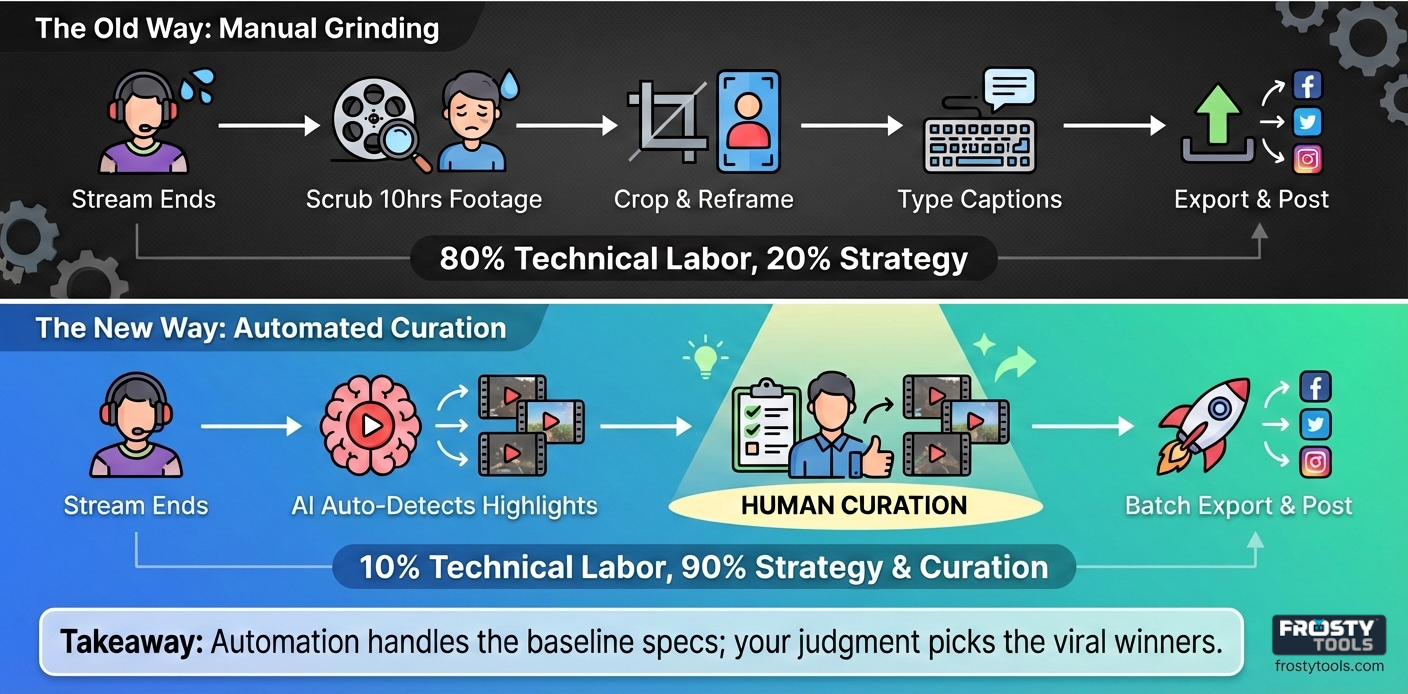 The automation of clip creation changes what it means to be a content creator. The technical skill of cropping video and adding subtitles no longer provides a competitive advantage. These are baseline expectations handled by software.
The new differentiator is curation: selecting which moments to share and understanding what resonates with your audience. Tools that combine automation with human judgment produce better results than either approach alone.
We're moving toward real-time processing where a Victory Royale in Fortnite or a hilarious reaction to a chat message triggers an automated pipeline that posts a clip to TikTok while you're still live. That technology isn't far off. The groundwork exists in tools that monitor chat sentiment and mark timestamps during broadcasts rather than after them.
For now, the best strategy combines the speed of automated detection with the judgment of human curation. Whether that human judgment comes from AI analyzing transcripts, your community marking timestamps, or your post-stream review depends on your content type and available time.
The era of spending 40 hours per month editing clips is over. The question isn't whether to automate, but which automation approach fits your content best.
Ready to reclaim your time? At FrostyTools, we help Twitch streamers build stronger communities while spending less time on busywork.
Our Highlight Hunter uses AI to find genuinely entertaining moments—reactions, comedy, big game moments, great stories shared live–clips that work without context.
Our Smart Chatbot keeps engagement high with features like automated shoutouts and personalized welcomes.
The Chat Quiz Twitch extension helps you earn an income, while having a great time with your community.
Connect your Twitch account in under a minute at frostytools.com to see how community-focused tools can transform your streaming experience.