How to Get the Best Results From Highlight Hunter and Shortify (2026)
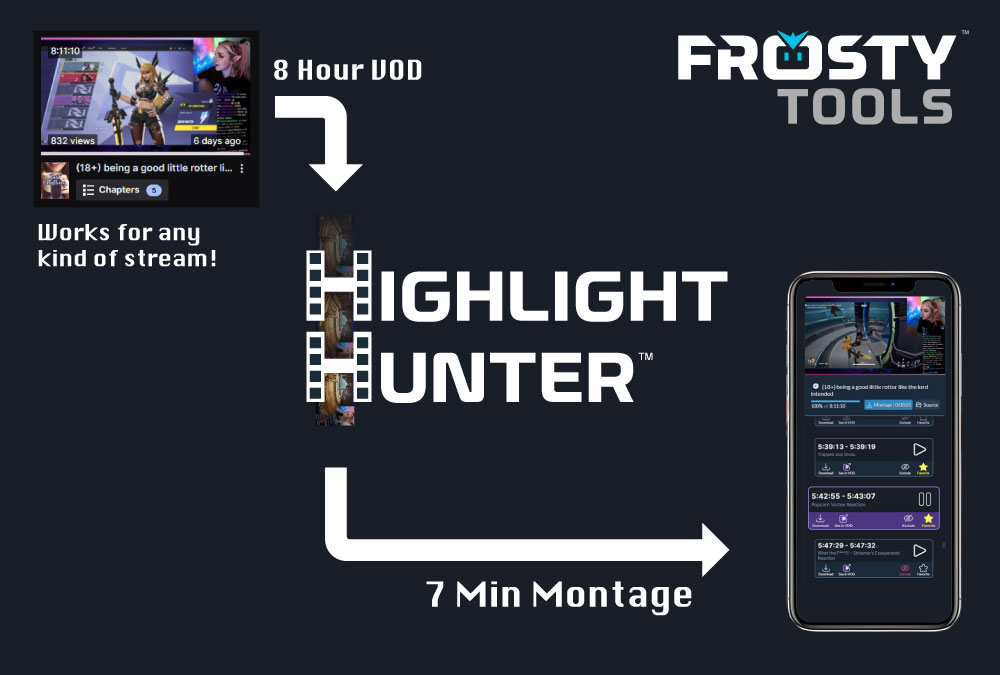
Highlight Hunter works best when you treat it like a repeatable clip discovery workflow, not a magic button. The goal is to find the strongest moments in your Twitch VOD, choose the clips that actually represent your stream, and use Shortify to turn those moments into vertical social posts without making editing your second job.
The core value is simple: one good Twitch VOD can become a long-tail source of social content. You are not hunting for one perfect short and throwing the rest away. If the stream had real moments, Highlight Hunter can bring the best candidates forward, and Shortify can make posting to TikTok, YouTube Shorts, and Instagram Reels practical enough to do consistently.
The return comes from frequency. Instead of spending all week perfecting one short, use Highlight Hunter to review the VOD, Shortify the strongest candidates, and publish often enough to learn what viewers respond to.
This guide explains how to get better results from Highlight Hunter and Shortify, what kind of source material gives the system the most to work with, when Scout is the right choice, when Supercharged is worth the extra tokens, and how to turn a single strong stream into a steady run of social posts.
Pay As You Go, Not Another Monthly Subscription
Highlight Hunter and Shortify are pay as you go with FrostyTools Tokens. That is a major difference from many clip tools that require a monthly subscription before you can make the workflow useful.
You can buy tokens when you have a VOD to process, use them for Highlight Hunter and Shortify, and come back when you have more content. Benefactor is available if you want monthly Benefactor Bonus TokensBenefactor Bonus Tokens are the fuel you need for Highlight Hunter and Shortify. Valid for as long as you're a Benefactor. plus the other FrostyTools subscription perks, but a subscription is not required to use Highlight Hunter.
Buy tokens when you have VODs.
Great for creators who want to process a stream, test a few Shortify renders, or use Supercharged on a high-value VOD without adding another monthly bill.
Subscribe only when Benefactor fits your routine.
Benefactor makes sense when Highlight Hunter and Shortify are part of your ongoing growth workflow and you want monthly Benefactor Bonus TokensBenefactor Bonus Tokens are the fuel you need for Highlight Hunter and Shortify. Valid for as long as you're a Benefactor. along with the rest of the subscription benefits.
The Short Version
- Start with a VOD that has real moments. The best results come from streams with clear commentary, reactions, chat interaction, story beats, jokes, clutch plays, or useful explanations.
- Make the source easy to understand. Keep your voice audible over game sound, talk through important moments, and check that your Twitch VOD actually saved your commentary.
- Use Scout for most streams. Scout is the practical choice for everyday VOD review and should be where most creators start.
- Save Supercharged for high-bar VODs. It costs considerably more tokens because it is significantly more costly for FrostyTools to run on the back end, but when the content quality is there, it can produce much better results than Scout.
- Shortify the moments that can stand alone. The clip should make sense to someone who was not there live.
- Post for rhythm, not perfection. One strong VOD can create several posts; frequency gives you more chances to learn what works.
- Pay as you go. Buy tokens when you have VODs to process; choose Benefactor only if the monthly Benefactor Bonus TokensBenefactor Bonus Tokens are the fuel you need for Highlight Hunter and Shortify. Valid for as long as you're a Benefactor. and subscription perks fit your routine.
Good Source Material Matters
Highlight Hunter evaluates what is actually in the VOD. If the recording is silent, the mic is missing from the saved VOD, your voice is buried under game audio, reactions are muted, or nothing really happens, neither Scout nor Supercharged can invent a great short.
The easiest way to get better results is to give both modes stronger signals. A strong VOD does not need every item below, but the more of these that are present, the easier it is for Highlight Hunter to find clips that can work outside the livestream.
Audible saved commentary
Make sure your voice is saved in the VOD and clear over game sound, music, and alerts. If the mic is missing or buried, check before spending tokens.
Clear streamer context
Say what you are trying, why a play matters, what chat said, or why a moment is funny. Context helps a clip make sense to new viewers.
Visible reactions
Laughs, surprise, tension, frustration, celebration, and disbelief give the moment emotional shape and make the payoff easier to recognize.
Chat moments with setup
If chat says something funny or important, read enough of it out loud that the VOD still carries the moment after the live chat has moved on.
Obvious clip calls
If you or chat says "clip that," "someone clip this," or "we need that," say it clearly. Those moments are useful signals for later review.
A complete moment
The strongest clips usually have setup, payoff, and a clean enough ending. A highlight should feel like a finished beat, not a random slice of footage.
Saved mic audio is worth calling out because it is a real issue for newer streamers and for experienced streamers with more complex OBS or Twitch audio setups. Your stream can sound fine live while the saved VOD misses your microphone or buries it under game sound, music, or alerts. That makes the clip harder for viewers to understand and gives Highlight Hunter less personality and context to evaluate.
This is not about blaming the creator when a hunt returns fewer results. It is about being honest about short-form video. A clip needs a reason to exist outside the livestream, and Highlight Hunter is strongest when the VOD gives it context, personality, and payoff to work with.
Where the Editor Still Matters
Highlight Hunter finds candidates. Editors make the call.
The streamer creates the moments. The editor decides what deserves to become a clip, a post, a montage, or a polished edit. Highlight Hunter is built for the part in between: finding promising moments inside long VODs so editors can spend less time scrubbing and more time doing the creative work.
Highlight Hunter reduces the search step. Editors can spend that time on taste, story, pacing, captions, titles, and publishing decisions.
The creator and editor still decide what is worth publishing. Highlight Hunter removes the tedious search step so human taste has more room to shape the result.
How to Stream So Future Clips Are Easier to Find
The best Highlight Hunter results often start before you click the scan button. Small on-stream habits make the VOD easier to review later.
Narrate your decisions. If you are about to make a risky play, explain the risk. If chat says something funny, read enough of it out loud that the recording has context. If something surprising happens, react naturally instead of moving on silently.
You do not need to perform every second. You just want the important moments to have enough audio, emotion, and context that a viewer can understand why they matter.
A useful rule: stream as if one person might discover you through a clip tomorrow. That person will not know the inside joke, the last 20 minutes of setup, or what chat was seeing unless the moment carries enough of that context in the recording.
Why One VOD Has Long-Tail Value
A Twitch stream already took the time, energy, and attention to create. The waste is letting it become one archived VOD that only a few people ever revisit.
Highlight Hunter changes that by making the first job review instead of manual searching. Shortify changes the second job by making social formatting practical. Together, they help one strong stream keep working after you go offline.
Highlight Hunter reduces the search.
Instead of scrubbing the full VOD from a blank timeline, you review candidate moments that deserve a closer look.
Shortify reduces the edit tax.
Selected moments can become vertical captioned videos without turning each post into a full editing project.
Frequency creates the return.
A clutch play, funny chat exchange, useful explanation, strong reaction, and story beat can each become a separate post.
The stream keeps working.
One or two good streams can create a meaningful social run when you review, Shortify, and publish on a steady rhythm.
This is the difference between treating a VOD as an archive and treating it as a content source. You are not trying to squeeze one flawless short out of every stream. You are building a repeatable way to turn strong moments into more chances for people to discover your humor, skill, voice, community, and point of view.
Scout vs. Supercharged: Choose Based on the VOD and Your Bar
Scout and Supercharged are not a ladder where everyone must run Scout and then run Supercharged. They are different choices for different VODs, expectations, and budgets.
Use Scout for most streams.
Scout is the practical, efficient choice for everyday VOD review. It does a great job finding useful markers, recap moments, hidden gems, and solid candidates without spending the extra tokens Supercharged requires.
Use Supercharged when the VOD deserves the extra pass.
Supercharged is the premier option for creators with a very high bar and VODs with strong source material. It is not required for most streams.
For most creators and most VODs, Scout should be the starting recommendation. It reduces the hardest part of clipping: staring at a blank timeline and trying to remember where the stream got good.
Supercharged is for once-in-a-while situations: a special event, tournament, launch, collab, community milestone, unusually strong stream, or VOD where you already remember moments that felt worth pushing harder. It costs considerably more tokens because it is significantly more costly for FrostyTools to run on the back end.
The honest tradeoff is also the sales pitch: when the content quality is there, Supercharged can produce much better results than Scout. It can spend more effort judging context, timing, setup, payoff, standalone value, and whether a clip can carry itself. But when the VOD is quiet, flat, light on reactions, or your voice is buried under game audio, even the premier pass cannot magically create a great clip.
Shortify Is Where Clip Discovery Becomes Social Output
Finding a highlight is only half the workflow. Shortify is the bridge from Twitch VOD moment to vertical social post.

From reviewed moment to publishable short.
Shortify helps turn selected highlights and Twitch clips into captioned vertical videos for phone feeds. That matters because many streamers have good moments but not the time or energy to make every post by hand.
Saving time is only part of it. Shortify can change how often you publish. A good stream might give you one clutch play, one funny chat exchange, one useful explanation, one strong reaction, and one story beat that explains who you are as a streamer. Those do not need to become one giant montage. Each can become its own post.
That is the long-tail advantage: one VOD can create multiple chances for someone to discover your stream. One or two good streams can create a meaningful run of social content if you consistently review, Shortify, and publish.
Do Not Over-Obsess on the Perfect Short
Perfectionism kills clip output.
A polished short is great, but a streamer who posts one perfect clip every few weeks is giving social platforms very little to work with. A streamer who posts consistently gets more chances to learn what holds attention, what brings people back, and what kind of moments make viewers want to see the stream live.
That does not mean posting everything. You still need judgment. It means the target is a repeatable standard, not endless polishing.
Ask:
- Does the clip make sense without the full VOD?
- Is there a clear reason to keep watching?
- Does it show the stream's humor, skill, personality, or community?
- Are the captions readable?
- Would this be worth testing as a post?
If yes, post it and learn. The feedback from frequency is more useful than guessing forever in the editor.
What Not to Do
Avoid these common mistakes:
- Rerunning the same weak section and expecting a different outcome. If a selected window was already scanned, results will usually be similar because the system is evaluating the same VOD moments, audio, reactions, and chat context.
- Using Supercharged when the VOD quality does not support it. Save it for strong source material, high-value streams, or situations where your bar for clip quality is especially high.
- Shortifying every candidate without reviewing. Highlight Hunter moves you from searching to reviewing; your judgment still matters.
- Ignoring saved audio. If your commentary is not in the Twitch VOD, the system has less context and the final clip has less personality.
- Waiting for the perfect stream. A normal stream with one good reaction, joke, or explanation can still produce a useful post.
A Simple Workflow
- Pick a recent public Twitch VOD that had energy, reactions, chat interaction, useful explanation, or memorable moments.
- Choose Scout for everyday review, especially when you are unsure how strong the VOD is.
- Review candidates and favorite the moments that feel like your stream.
- Choose Supercharged only when the stakes are higher, the source material is strong, and you want the premier pass.
- Shortify the best candidates into vertical captioned videos.
- Post on a steady rhythm across TikTok, YouTube Shorts, and Instagram Reels.
- Track what viewers respond to, then use that feedback to choose better moments next time.
Before You Spend Tokens, Check This
Use this quick checklist before a hunt:
- Is the VOD public?
- Is your mic or commentary audio saved in the Twitch VOD?
- Is your voice loud enough compared with game sound, music, and alerts?
- Were there reactions, jokes, explanations, chat moments, clutch plays, or clear clip calls?
- Are you scanning a section that has not already been scanned recently?
- Is this an everyday hunt for Scout, or a high-value VOD for Supercharged?
- Do you have enough tokens for the hunt and the Shortify renders you may want afterward?
- Would a one-time token pack cover this push, or do you process often enough that Benefactor makes sense?
The Point
Highlight Hunter helps you stop losing good stream moments to the VOD archive. Shortify helps turn those moments into social posts without making every clip a major edit.
Use Scout broadly. Choose Supercharged when the VOD quality and your expectations justify the premier pass. Give the system good source material. Then use Shortify to turn the best finds into a long-tail posting rhythm and post often enough to learn.
Turn one good VOD into multiple chances to be discovered.
Start a hunt, buy tokens as needed, or use Benefactor if monthly Benefactor Bonus TokensBenefactor Bonus Tokens are the fuel you need for Highlight Hunter and Shortify. Valid for as long as you're a Benefactor. and the subscription perks fit your workflow.
