

Highlight Hunter + Shortify

Turn one goodTwitch VOD intoMany Social Posts.

Your stream already made the moments. Highlight Hunter scans your public Twitch VODs for the jokes, clutch plays, stories, reactions, and chat moments people can understand without being there live. Shortify makes those keepers easy to turn into captioned vertical posts for TikTok, YouTube Shorts, and Instagram Reels, so one strong VOD can keep creating discovery chances after you go offline.

The high-value loop
1 Good VOD->Multiple Highlights->Many Social Posts

The return comes from the long tail. Do not spend all week perfecting one short while the rest of the stream disappears. Hunt the VOD, Shortify the best candidates, post consistently, and let one or two strong streams create a steady social presence over time.

Twitch VOD clip finderShortify vertical clipsPay as you goNo subscription requiredMany posts from one stream
Start a hunt with TwitchSee how it works
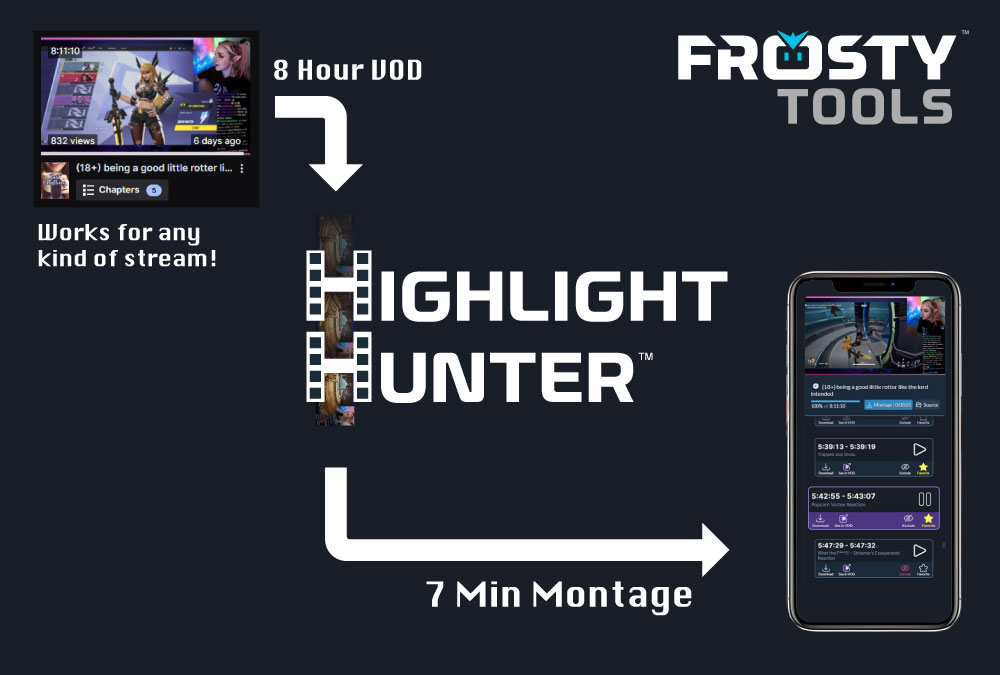
Highlight Hunter turns a long Twitch VOD into a shorter highlight montage
Long VODHours of stream footage with moments hidden inside.
HuntCandidate clips brought forward for review.
OutputFavorites, montages, downloads, or Shortify renders.

The growth loop

1 Good VOD -> Multiple Highlights -> Many Social Posts.

One good stream can become a long-tail library of posts that keeps reaching people, instead of stopping at one perfect short.

One stream can hold a long tail of usable moments.

When a VOD has good material, Highlight Hunter helps uncover more than a single clip idea: plays, reactions, jokes, chat moments, explanations, and story beats that can each become their own post and give the stream another chance to be discovered.

Shortify makes posting on socials practical.

Shortify turns selected highlights into vertical captioned clips, so publishing to TikTok, YouTube Shorts, and Instagram Reels stops feeling like a full editing project every time.

Frequency beats over-obsession.

The objective is a repeatable rhythm: get clips out, learn what resonates, and keep your stream visible between go-live notifications. Consistent posting from the long tail of one or two good streams can matter more than polishing one clip forever.

Want the deeper playbook? Read the guide on choosing better VODs, using Scout and Supercharged wisely, and turning highlights into a posting rhythm with Shortify.

How to get better results

The real problem

The stream ends. The best parts should not disappear with it.

After a long stream, scrubbing the whole VOD asks you to be editor, social manager, and streamer all over again. Most creators know they should post more clips; the bottleneck is finding the few minutes that are actually worth sharing.

Highlight Hunter changes that work from searching to reviewing. It brings candidate moments to you, so your judgment goes into choosing clips that represent your stream, your humor, and your community.

For editors

Editors keep the final cut.

The streamer creates the moments. The editor decides what deserves to become a clip, a post, a montage, or a polished edit. Highlight Hunter is built for the part in between: finding promising moments inside long VODs so editors can spend less time scrubbing and more time doing the creative work.

Less blank-timeline searching

The hunt brings forward candidates, so review starts with moments worth checking instead of hours of manual scanning.

Human judgment stays central

Editors and creators still decide what fits the channel, the story, the pacing, the caption, and the final post.

More time for creative work

Video processing creates room for better clips, stronger edits, and more consistent publishing from the content you already made.

Why streamers use it

From lost VODs to a repeatable clip workflow.

Highlight Hunter is built for the exact after-stream job that usually gets postponed: turn a live moment into something your next viewer can discover.

Spend your attention on decisions, not scrubbing.

Long VODs become a review queue of possible moments. You still pick the winners, but you are not starting from a blank timeline.

Find clips that can stand on their own.

The useful highlights are not always the loudest seconds. Highlight Hunter looks for setup, payoff, reaction, context, and a clear reason someone would keep watching.

Keep the moments your community remembers.

A great clip can be a play, a joke, a weird chat tangent, or a heartfelt moment. The point is to preserve what made the stream feel alive.

Highlight Hunter + Shortify

Try it now. Pay as you go. No subscription necessary.

Use FrostyTools Tokens only when you want to hunt a VOD or Shortify a clip. Benefactor simply adds monthly tokens plus the other subscription perks.

How it works

A VOD-to-clip workflow without the blank timeline.

Choose a VOD, run a hunt, review what it finds, and turn the keepers into the format that fits your next post, recap, or edit.

01

Choose a public Twitch VOD

Pick a recent public stream instead of downloading hours of footage and opening an editor before you even know what is usable.

02

Scan for watch value

Highlight Hunter looks for moments with a reason to exist on their own: reactions, jokes, clutch plays, useful explanations, stories, and chat payoffs.

03

Curate the keepers

Review the candidates, favorite the ones that feel like you, exclude misses, and jump back to the exact moment on Twitch when you want context.

04

Turn the hunt into output

Use your favorites for a montage, a browser-source recap, downloads for editing, or a Shortify render for vertical social platforms.

Highlight Hunter and Shortify logo
Selected highlight becomes a vertical short.

Source moment, frame choice, captions, and export all live in the same after-stream workflow.

Shortify

Turn selected Twitch highlights into vertical social clips.

Finding the moment is only half the job. Shortify takes selected highlights and turns them into vertical, captioned videos built for the places where new viewers discover streamers: TikTok, YouTube Shorts, and Instagram Reels. That is how a single VOD can become a run of posts instead of one forgotten archive link.

Captions that make silent scrolling possible.

Shortify renders social clips with captions so the moment can land without audio.

A vertical frame for short-form platforms.

The output is shaped for phone feeds instead of leaving your landscape VOD untouched.

Editor-friendly material when you want control.

Download rendered clips and supporting editor files when you want to keep polishing.

Works for Scout and Supercharged

Give the hunt real moments to work with.

These are not Supercharged-only tips. Both modes get better when the VOD has strong signals: Scout can find better markers; Supercharged can make stronger judgments. The source still matters.

Read the best-results guide

Clear commentary

Say what happened, why it matters, and what you are thinking in the moment.

Big reactions

Laughs, surprise, celebration, tension, and disbelief give clips emotional shape.

Funny chat moments

Read or react to enough of chat that the VOD keeps the context for future viewers.

Clip calls

Say "clip that" or "someone clip this" out loud when a moment deserves attention.

Audible commentary

Keep talking through key moments and make sure your voice is clear over game audio.

Pick the right hunt

Use Scout for most streams. Save Supercharged for the exceptional ones.

Scout is the recommended choice for everyday VOD review. Supercharged is the premier pass for the occasional high-quality VOD where the source material, stakes, and expectations justify a deeper and more expensive hunt.

Recommended for most hunts

Start with Scout for regular streams.

Scout does a great job surfacing useful markers and clip candidates without spending the extra tokens Supercharged requires. For most VODs, that is the right tradeoff.

Superchargedis the premier pass for high-bar VODs.

Supercharged is not required for most streams. Choose it for the rare VOD with strong source material, real stakes, or moments that need a higher bar.

Higher-cost pass

Supercharged costs considerably more tokens because it is significantly more costly for FrostyTools to run on the back end.

Higher-ceiling results

When the content quality is there, it can produce much better results than Scout.

Use it selectively. Quiet, flat, low-reaction VODs or buried commentary still limit what any hunt can find.

High-value streams

Events, collabs, milestones, standout VODs, or remembered clip moments.

Exceptional bar

Deeper judgment on setup, payoff, context, and standalone clip value.

Scout remains the default.

Use Scout for normal review. Upgrade only when quality justifies the cost.

Scout

Best default for normal streams and everyday VOD review.

Scout should be where most creators start. It helps surface snappy moments, recap-worthy beats, and timestamps you can revisit without committing to the deepest analysis every time.

  • Recommended for most streams
  • Snappy cuts for montages and recaps
  • A practical first pass for long VODs
Supercharged

Best for occasional high-bar VODs and special streams.

Use Supercharged when the VOD is strong enough to deserve more expensive analysis and the final clip candidates need to meet a higher bar.

  • Not required for most hunts
  • Higher ceiling when the content quality is there
  • Best for high-value VODs, events, and special streams

Get Highlight Hunter

Pay as you go. No subscription required.

That is a major benefit of Highlight Hunter and Shortify: you do not need another subscription just to turn VODs into clips and social posts. Buy tokens when you have VODs to process, or choose Benefactor if you want monthly tokens plus the rest of the Benefactor perks.

Use tokens when you need them, not because a subscription clock is running.

For occasional streams, one-time token packs keep Highlight Hunter and Shortify practical. For regular creators, Benefactor adds a recurring monthly token supply along with the other FrostyTools subscription benefits.

Pay as you go

Buy tokens as needed

Token packs are one-time purchases for creators who want to process a strong VOD, test a few Shortify renders, or run Supercharged on a high-value stream without starting a subscription.

  • Good for special events, launch weeks, tournaments, and backlog cleanup
  • Use tokens across Highlight Hunter and Shortify
  • Start small, then add more only when you need them

Tokens attach to your Twitch account. Connect Twitch before buying if you have not signed in yet.

Questions streamers ask

Honest answers before you spend time or tokens.

What is Highlight Hunter?

Highlight Hunter is a FrostyTools workflow that scans public Twitch VODs for moments worth keeping so streamers do not have to manually scrub an entire stream before making clips.

What does Shortify do?

Shortify takes a selected highlight or Twitch clip and renders it as a vertical, captioned short-form video for TikTok, YouTube Shorts, and Instagram Reels.

Does Highlight Hunter replace my judgment?

No. Highlight Hunter moves you from searching to reviewing. You still choose what represents your stream, your humor, and your community.

What kinds of Twitch streams work best?

Clear commentary, big reactions, funny chat moments, educational explanations, obvious clip calls, and audible voice audio all give Highlight Hunter better material to evaluate.

When should I use Supercharged?

Scout is the right choice for most streams. Use Supercharged selectively when the VOD has strong source material, the stream matters, and your bar for clip quality is unusually high. It costs considerably more tokens because it is significantly more costly for FrostyTools to run on the back end, but when the content quality is there, it can produce much better results than Scout.

What if my VOD does not have good clips?

Some streams have no strong standalone moments. Highlight Hunter should make that clear instead of pretending every VOD deserves a pile of clips.

Your next stream should leave something behind.

Start with the VOD you already have. Let Highlight Hunter surface the candidates, choose the moments that feel right, then use Shortify to turn one good stream into a long-tail run of social posts.